Master Your Infrastructure with FoxTerm
The all-in-one native terminal for macOS and iOS. SSH, SFTP, Metal-accelerated VNC, real-time Linux monitoring, and visual Docker/Podman management — secure, blazingly fast, and ready the instant you launch it.

Engineered for Performance. Crafted for Clarity.
No web wrappers, no bloat. FoxTerm pairs minimalist industrial design with uncompromising native rendering performance.
Native Performance
Built on Swift and Metal acceleration to deliver near-zero latency command input and fluid screen rendering.
Geometric Precision
Clean low-poly geometric facets that eliminate visual noise, offering a sharp, distraction-free developer workspace.
Unified Workflow
Unifies remote shell, file transfer, GUI desktop, and container management into a single cohesive interface.
Defined by Sharp Facets.
Engineered for Agility.
The brand mark adopts a low-poly geometric design, replacing complex curves with crisp, calculated vector facets that symbolize precision and velocity.
This design language directly mirrors our software philosophy: Zero bloat, pure native execution, and maximum efficiency.
01 / SHARP EDGES
Clean vector lines emphasizing immediate terminal responsiveness.
02 / HIERARCHY
Rich contrast shading crafted for dark mode environments.
03 / STABILITY
Interlocking geometry mirroring secure network protocols.
04 / EFFICIENCY
Converging lines focusing complexity into effortless workflows.
Localized Encryption,
Complete Data Sovereignty
Your server keys are your core assets. FoxTerm enforces strict zero-telemetry with 100% localized encryption and hardware isolation.
Comprehensive Capabilities
Everything modern server management needs, unified in one workflow.
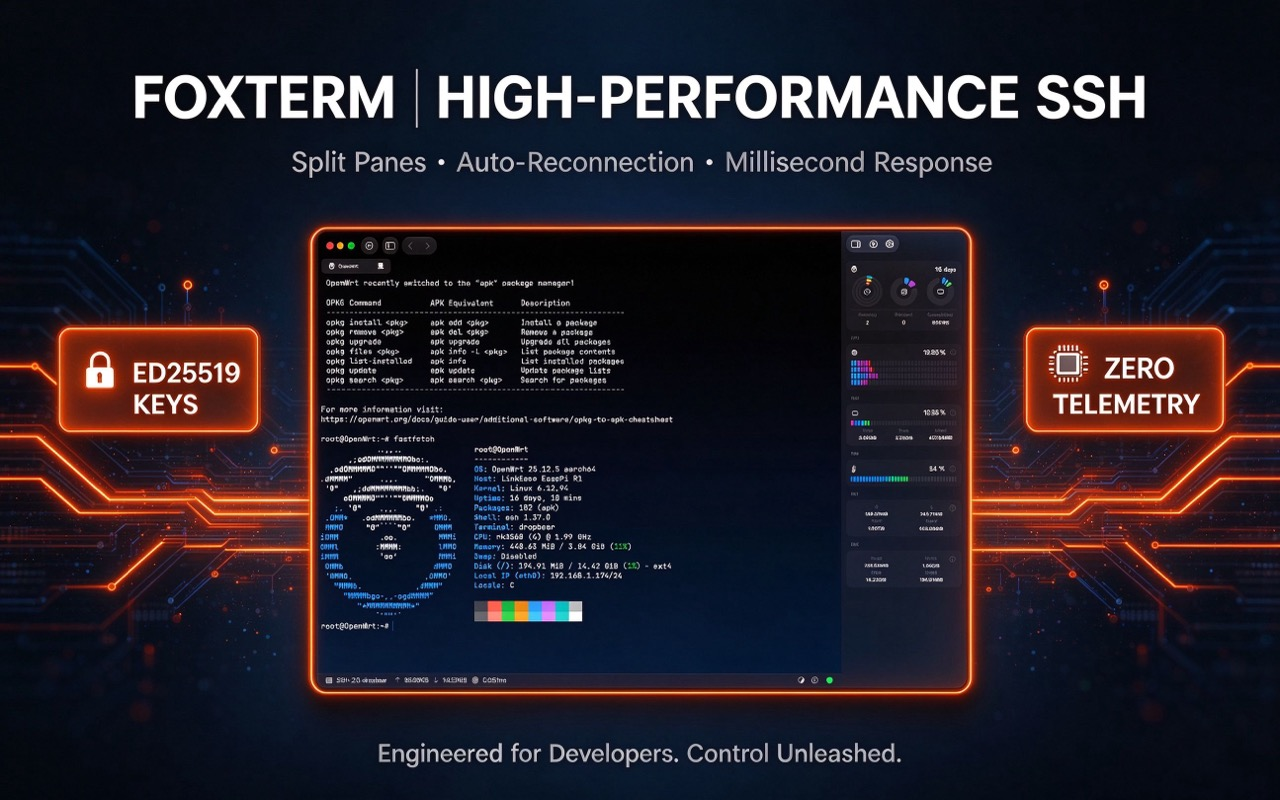
High-Performance SSH
Supports Ed25519 keys, split-pane tabs, command snippets, and intelligent auto-reconnection with millisecond response times.
Real-Time Telemetry
Active visualization for CPU, memory, disk I/O, network throughput, and GPU/VRAM metrics.
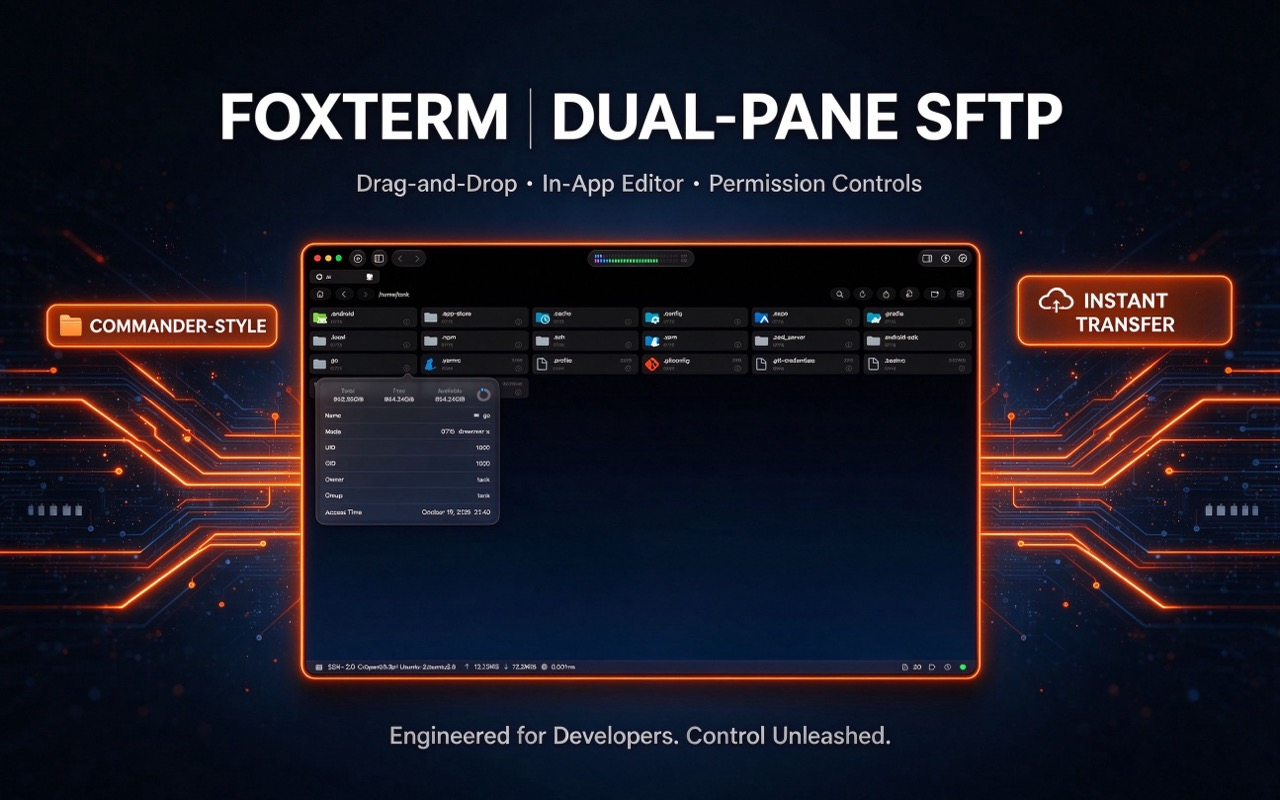
SFTP File Transfer
Drag-and-drop file transfers, in-app editor, and permission controls.
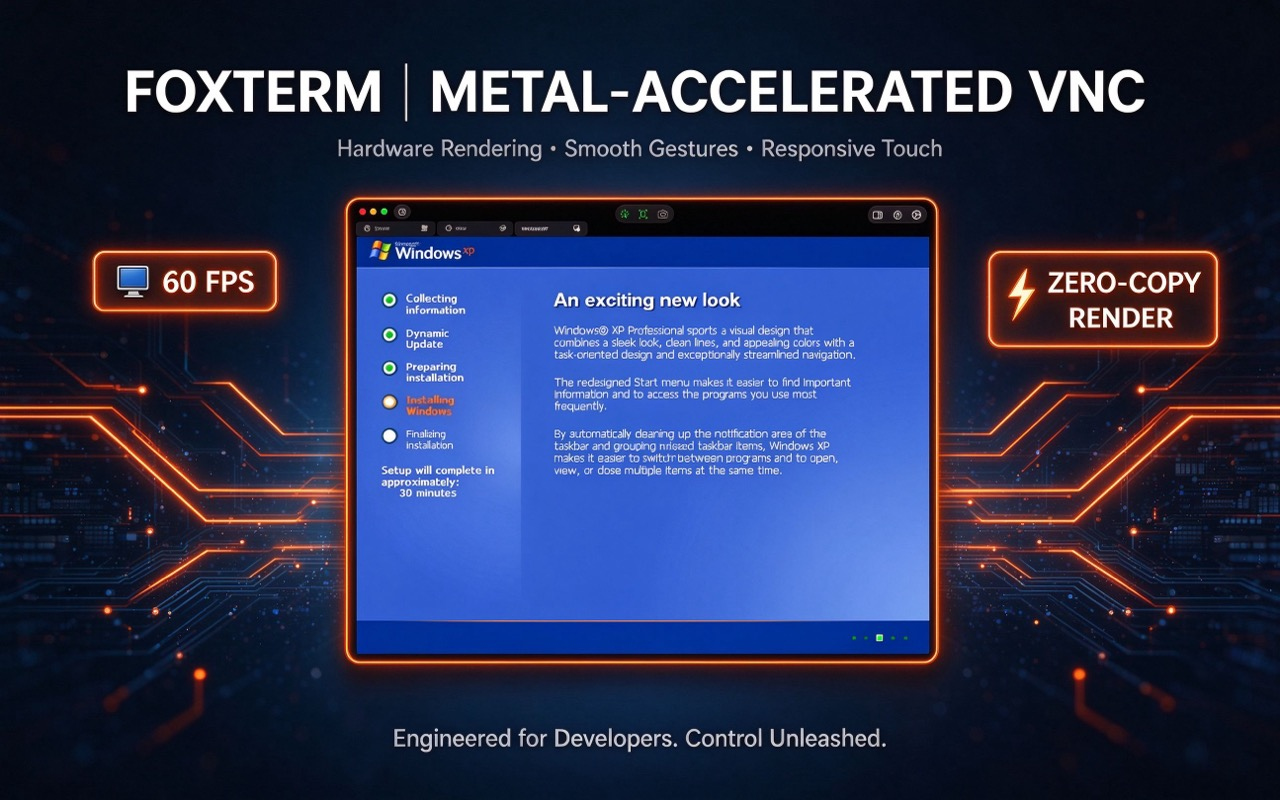
Metal-Accelerated VNC
Hardware-accelerated VNC engine for smooth remote desktop access, tuned for touch and gestures.
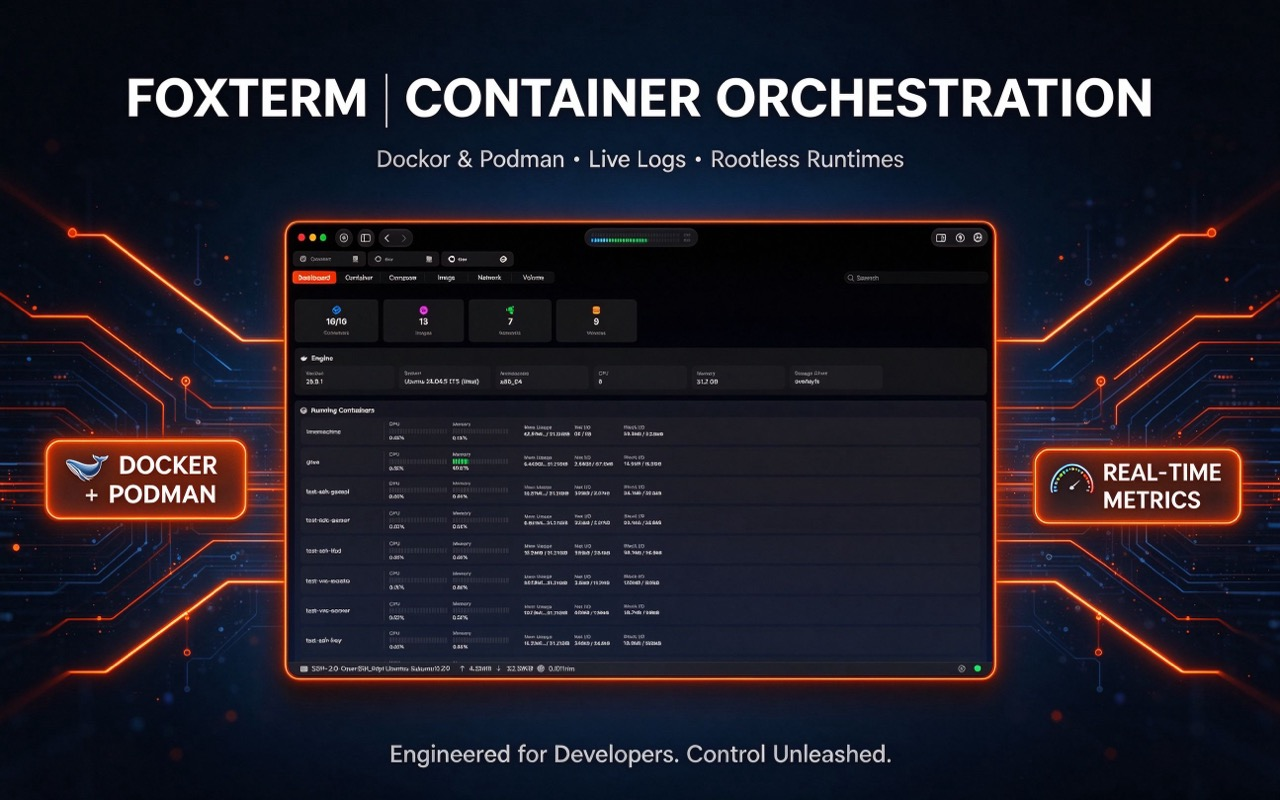
Container Orchestration
Visual dashboard for containers, images, and volumes, supporting Rootless runtimes and live log streaming.
Universal Purchase
One subscription covers both macOS and iOS/iPadOS; every feature is free with only a node cap — go Pro to unlock unlimited nodes.
One Toolkit for Every Remote Workflow
From on-call production triage to weekend homelab tinkering, FoxTerm adapts to the way you manage machines.
SRE & DevOps On-Call
Open a session in seconds, tail container logs, and read live CPU, memory and disk I/O before a blip becomes an outage.
Homelab & Self-Hosters
Run routers, NAS devices, and Docker/Podman stacks from your Mac or phone — no jump host, no cloud gateway, no middleman.
Network & Edge Engineers
Reach OpenWrt, IoT, and remote edge gear over SSH, SFTP, and smooth Metal VNC — even over an unreliable cellular link.
Mobile-First Admins
Drive a full terminal, transfer files, and restart a container from iPhone or iPad with native touch, gestures, and shortcuts.
Architectural Superiority
FoxTerm versus legacy CLI tools and cloud-dependent SaaS apps.
| Dimension | FoxTerm | Traditional CLI Tools | Cloud-Sync SaaS Apps |
|---|---|---|---|
| Privacy & Telemetry | ✓ 100% Local / Zero Telemetry | ✓ Local Only | ✗ Centralized Cloud Sync |
| Key Protection | ✓ Secure Enclave Hardware | ~ Plain File System | ✗ Third-Party Cloud Servers |
| Container UI | ✓ Native Docker & Podman GUI | ✗ CLI Only | ~ Basic Log Viewer |
| Render Engine | ✓ Native Swift & Metal | ~ Basic Text Rendering | ✗ Electron Heavy Wrapper |
| Universal Platform | ✓ macOS + iOS Universal | ✗ Desktop / Mobile Split | ~ Separate Purchases |
Every Feature Is Free. Pro Just Lifts the Limit.
Free includes every capability — SSH, SFTP, VNC, live telemetry, and containers — with only a cap on the number of nodes. Pro removes that cap for larger fleets, across all your devices.
Free
No card requiredEvery feature, a capped number of nodes
- ✓Full SSH terminal with split panes, tabs, and snippets
- ✓SFTP transfers, Metal VNC, and real-time telemetry
- ✓Visual Docker & Podman management
- ✓Secure Enclave keys, zero telemetry, iCloud sync
- ~Capped number of nodes (servers)
FoxTerm Pro
RecommendedEverything in Free, with the node cap removed
- ✓Every feature in the Free build
- ✓Unlimited nodes (servers) for growing fleets
- ✓Universal on macOS + iOS/iPadOS with one Apple ID
- ✓All future Pro enhancements
- ✓Priority support, straight from the developer
Two ways to unlock Pro on macOS
The App Store edition (macOS + iOS) is governed by Apple's policies and unlocks via Universal Purchase; the notarized edition applies to macOS only — activation codes do not include iOS.
Mac App Store Edition
- ✓Monthly or yearly subscription, billed by Apple
- ✓Universal Purchase — activates macOS and iOS automatically
- ✓Cancel anytime; renewals and refunds handled by Apple
Notarized Edition for macOS
- ✓Direct, signed and notarized macOS build — no App Store required
- ✓Unlock with an activation code purchased directly at pay.foxterm.app
- ✓macOS only — independent from the App Store edition
The iOS app is free on the App Store and unlocks automatically when Pro is activated via the App Store edition. Connection profiles and configuration sync across devices through your private iCloud container.
Everything You Need to Know About FoxTerm
Security, Pro licensing, and native performance — explained plainly.
Q: What is FoxTerm and what core features does it offer?
FoxTerm is an all-in-one, privacy-first server management application built natively for macOS and iOS. It unifies high-performance SSH terminal access, SFTP file management, Metal-accelerated VNC remote desktop, real-time system telemetry, and visual Docker & Podman container control.
Q: What is the difference between the free version and Pro? How does the App Store edition work across devices?
The free version is not a crippled demo — every capability, from the SSH terminal and SFTP to Metal-accelerated VNC, real-time telemetry, and Docker & Podman management, is fully unlocked. The only limit is the number of nodes (servers) you can manage. Subscribing to FoxTerm Pro removes that cap for unlimited nodes; the App Store edition (macOS + iOS) unlocks both macOS and iOS/iPadOS clients simultaneously under the same Apple ID via Universal Purchase, with encrypted configuration sync via your personal iCloud container. The notarized edition is a standalone macOS version — activation codes apply to macOS only.SSH terminal
Q: How does FoxTerm secure my server keys and connection credentials?
FoxTerm operates under a strict zero-telemetry policy with 100% localized data encryption. Server credentials and SSH private keys are hardware-isolated inside Apple Secure Enclave and Keychain, with no data ever sent to third-party servers.
Q: How is FoxTerm different from Electron-based terminal clients?
FoxTerm is not an Electron wrapper. It is engineered from the ground up using Native Swift, Metal hardware acceleration, and C-native libraries (OpenSSL, libssh, libvncclient), delivering near-instant startup, ultra-low resource usage, and native iOS optimization.
Q: Which platforms and operating systems are supported?
FoxTerm is built natively for Apple platforms: it runs on macOS 14.0 or later and iOS/iPadOS 17.0 or later, including iPhone and iPad, with a single Universal Purchase unlocking every device. There is no Windows, Android, or Linux desktop build — FoxTerm is engineered exclusively for the native Apple stack.
Q: Which protocols and authentication methods are supported?
FoxTerm supports SSH, SFTP, and VNC connections, and manages Docker and Podman engines over SSH. It ships with modern ciphers and key types such as Ed25519, split-pane terminal sessions, command snippets, drag-and-drop SFTP transfers, and visual management of containers, images, and volumes.
Q: Does FoxTerm collect data or route my connections through its servers?
No. FoxTerm connects directly from your device to your own servers and never proxies your traffic. It enforces a strict zero-telemetry policy — no analytics, no activity tracking, and no connection logs. Credentials and private keys are encrypted on-device and isolated inside Apple Keychain and Secure Enclave.
Q: How do I get Pro on macOS, and how does iOS activation work?
There are two ways to get Pro on macOS. The Mac App Store edition is a monthly or yearly subscription billed by Apple, governed by Apple's policies, and automatically activates the iOS app via Universal Purchase — manage or cancel it in your Apple ID subscription settings, and renewals and refunds are handled by Apple. The notarized edition is a direct, signed macOS build that you unlock with an activation code purchased at pay.foxterm.app; it applies to macOS only and does not include iOS activation. The iOS app itself is free on the App Store.
Download FoxTerm and Connect in Seconds
Mac · iPhone · iPad — every feature is free to start; Pro on the App Store edition unlocks across Mac and iOS devices.


The notarized build is signed, notarized, and installs directly outside the App Store — unlock Pro with an activation code from pay.foxterm.app. Activation codes apply to the macOS notarized edition only; the iOS app unlocks automatically only via the App Store edition.